

Accessibility Technology at SUU
We are dedicated to fostering an accessible and supportive academic environment where every student can thrive. Recognizing the diverse needs of our student body, the Disability Resource Center is proud to introduce our Accessibility Technology Hub—your gateway to cutting-edge tools and software designed to enhance learning accessibility and academic success.
We offer a range of innovative and effective software and tools tailored to meet the varied needs of our students, ensuring everyone has equal opportunities to excel.
Welcome to the next step in your academic journey, where innovation meets accessibility.
Zoom AI

Zoom AI Companion is a powerful, integrated tool designed to revolutionize the way students capture, organize, and access their educational content directly within the Zoom platform. It serves as an intelligent notetaking assistant that accurately converts speech into searchable text and summaries in real-time. But it’s much more than just a transcription tool; it’s a comprehensive feature set that enhances learning experiences, boosts productivity, and breaks down barriers for students with disabilities without the need for third-party apps.
- Smart Meeting Summaries: Zoom automatically generates comprehensive summaries of lectures and discussions, capturing key topics and action items. These summaries are available immediately after class, ensuring students have organized notes without lifting a pen.
- Real-Time Transcription & Captions: Zoom provides live, accurate captioning and full transcriptions as the lecture happens. This immediate visual aid ensures that students don’t miss crucial information and can fully engage with the material as it is presented.
- Smart Recording & Chapters: For cloud recordings, Zoom AI automatically segments the video into "Smart Chapters," allowing students to easily navigate to specific sections of a lecture. It also highlights key takeaways, streamlining study sessions and research.
- In-Meeting AI Assistant: Students can interact with the AI Companion during a live session to ask questions like "What did the professor just say?" or "Catch me up," receiving private answers and clarifications without interrupting the class.
- Searchable Content: Transcripts and summaries are fully searchable, allowing students to quickly locate specific keywords, definitions, or exam topics within their recorded lectures and notes.
Empowering Diverse Learners: By providing built-in, real-time captioning and transcripts, Zoom supports students with diverse learning needs, including those with hearing impairments or processing differences that make traditional note-taking challenging.
Enhancing Study Efficiency: With Smart Chapters and automated summaries, students can review material more effectively, focusing only on the sections they need to reinforce, leading to better preparation and higher retention rates.
Fostering Independence and Confidence: Zoom AI empowers students to take control of their learning environment. Knowing that the AI is capturing every detail allows students to participate more confidently without the anxiety of missing information.
Encouraging Active Learning: Freed from the pressure of capturing every word manually, students can engage more actively in lectures and discussions, contributing to a richer and more interactive educational experience.
We’ve made accessing these tools straightforward for students. Zoom AI Companion features are often integrated directly into your SUU Zoom account. Eligible students can receive guidance on enabling and maximizing these features through SUU’s Disability Services. Our dedicated team is always ready to assist with setup, training, and any questions that arise to ensure you have the tools you need from day one.
Additionally, refer to our Digital Note Taking setup page for detailed instructions.
Enhanced Exam Accommodations
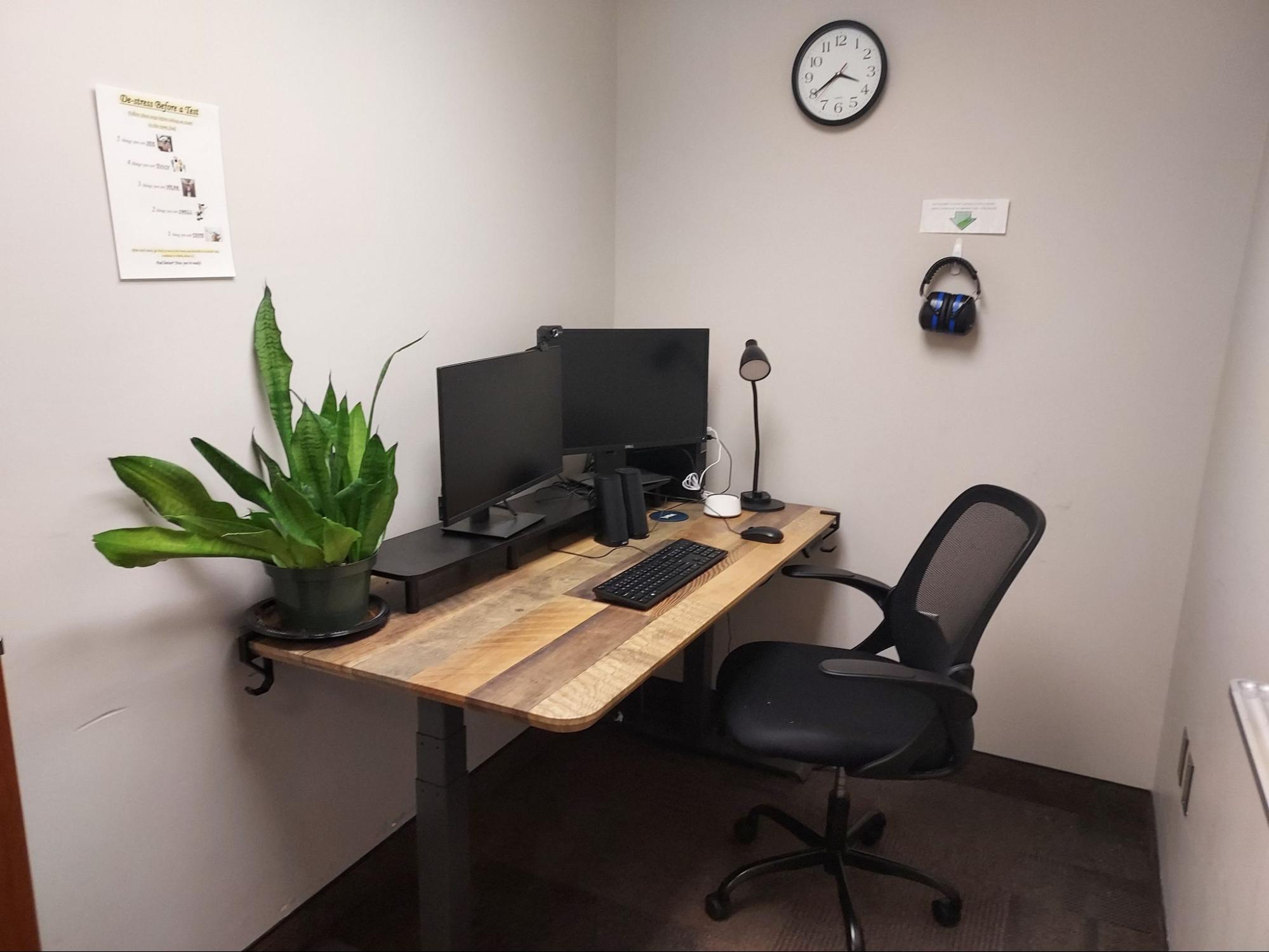 We are deeply committed to ensuring that every student has the necessary tools to achieve academic success, particularly during exams. The range of specialized devices in our testing rooms ensures that a variety of needs can be accommodated, providing a more accessible experience for any test taker.
These devices are specifically reserved for students to use as part of their exam accommodations or while utilizing resources within our center. Here's how these features and devices facilitate a supportive testing environment for students with disabilities.
- VoiceOver - Aiding Visual Accessibility: VoiceOver offers a comprehensive solution for visually impaired students taking exams. This feature provides audible descriptions of on-screen elements, enabling students to navigate exam materials independently and efficiently.
- Hearing Innovations for Clarity: With features like Made for iPhone hearing devices, students with hearing impairments can connect their aids directly to our Apple devices. Sound Recognition further enhances the testing environment by alerting students to important announcements or sounds, ensuring they remain fully informed throughout their exam.
- AssistiveTouch - Customized Control: AssistiveTouch supports students with motor skills challenges by adapting device interaction to their needs. This allows for a more comfortable and accessible exam-taking experience, minimizing physical strain and maximizing focus on exam content.
- Voice Control - Commanding Access: Voice Control enables students to operate their devices hands-free—a crucial feature for those with physical limitations. Whether navigating through exam questions or dictating answers, Voice Control ensures a seamless, accessible testing process.
- Spoken Content - Enhancing Comprehension: For auditory learners or students with reading difficulties, Spoken Content reads exam questions and instructions out loud. This auditory support can greatly assist in comprehension and retention of exam materials.
- Dimmable Lighting : We provide dimmable lighting in testing rooms as a sensory accommodation for students with light sensitivity or visual impairments.
- Noise-Canceling Headphones: We provide noise-canceling headphones in testing rooms as a sensory accommodation for students with auditory processing sensitivities or noise distractions.
- Standing desks: Our testing rooms include powered height-adjustable desks to help create a more comfortable and accessible testing environment. These desks can be raised or lowered at the touch of a button, allowing you to adjust the workspace to a seated or standing position and find a height that works best for you. This flexibility can be helpful for students with mobility, positioning, pain, fatigue, or other disability-related needs by making it easier to maintain a comfortable testing position.
- iMac - A Desktop Solution for Complex Exams: The iMac is available for students who require a large, clear display and robust processing power, particularly useful for complex visual tasks or design-based exams. Its accessibility features ensure that visual and auditory accommodations are seamlessly integrated.
- iPad Pro - Flexible and Portable Exam Assistance: The iPad Pro is ideal for exams that require portability and flexibility. Its range of accessibility features, combined with the ease of drawing, makes it a versatile choice for various accommodation needs.
- MacBook Air - The Lightweight Companion: For written exams or those requiring extensive typing, the MacBook Air provides a lightweight yet powerful solution. Equipped with full accessibility features, it ensures that students can comfortably complete their exams, regardless of physical or sensory challenges.
Outside of specialized computers and software, another particularly useful device students will find are the white noise machines in each of our private exam rooms. White noise machines produce a consistent sound that can help mask a range of external noises — from the footsteps in the hallway to the distant chatter of campus life.
The benefits of white noise are universal, but they can be particularly significant for students with certain disabilities. For individuals with ADHD, for example, white noise can help minimize the distraction of irregular sounds, supporting sustained attention and working memory. Students with anxiety disorders may find the soothing sounds calming, reducing exam-related stress and enabling them to focus more effectively on the task at hand. Furthermore, for those who are neurodiverse, including individuals on the autism spectrum, the predictability of white noise can create a comforting sense of stability and safety.
The inclusion of assistive technology into our exam rooms focuses on acknowledging and supporting the diverse needs of our student body. By providing an environment that can be customized to individual preferences, we empower our students to take control of their exam experience. This empowerment can lead to increased self-confidence, reduced test anxiety, and ultimately, improved academic performance.
For more information on accessing these devices for your exam accommodations or to learn how to utilize their accessibility features, please visit the Disability Resource Center.
JAWS: Screen Reader
 Educational resources that are accessible to all students, including those with visual impairments, is more important than ever. We are committed to providing students with the tools they need to succeed. Screen reader software stands out as a vital resource for accessibility.
Job Access With Speech (JAWS) is a comprehensive screen reading software that provides visually impaired users with the ability to access, navigate, and manage content on a computer screen via audio or Braille output. It's designed to make digital content accessible, from web pages and email to Microsoft Office documents and PDFs. JAWS is available on computers throughout our center for students to use, especially during exams.
- Versatility: JAWS is compatible with a wide range of applications, making it an invaluable tool for academic success.
- Advanced Navigation: With its array of navigation options, including text-to-speech and Braille output, JAWS enables students to efficiently interact with digital content.
- Customization: Each user can customize the software to meet their unique needs, ensuring a more personalized and effective learning experience.
NVDA is a free, open-source screen reader that offers similar functionalities to JAWS. It supports a wide range of languages and braille displays, making it a versatile choice for students.
Windows Narrator is a screen-reading app built into Windows 10 and 11, providing immediate access to text-to-speech technology without the need for additional software installation. It's a great starting point for those new to screen readers.
Speechify can make reading course materials easier and more flexible for students with disabilities. It can read webpages, PDFs, documents, and other digital text aloud, while highlighting words as they are spoken. Students can adjust the reading speed, choose from different voices, and listen to materials instead of relying only on visual reading. These features can be especially helpful for students with visual, reading, attention, or learning disabilities by giving them more options for accessing and understanding course content.
Our center is equipped with computers that have these screen reader technologies installed, ready for student use. This setup is particularly beneficial for exam accommodations, offering students the support they need to perform their best. By integrating JAWS, NVDA, Speechify, and Windows Narrator into our resources, we ensure that every student has the opportunity to access information and complete their work efficiently and independently.
Contact
Disability Resource Center